
The first thing that struck me about this WSDMAVIS Watch Timegrapher TGBC Calibrator Tool v4 wasn’t its compact shell, but how clearly it lets you hear and see tiny timing differences. I tested it with a smart watch and a mechanical model, and the six-way measurements—frequency, amplitude, polarization, dashed lines, waveform, rising angle—felt like a real-time tuning session. The built-in noise-quiet cavity and the ability to monitor via earphones kept magnetization and hiss at bay, so you trust what you’re adjusting. It plugs into Android devices and desktops alike, so you can calibrate anywhere, anytime.
In practice, the Android workflow is straightforward: open the PC software, pair via Type-C, and the tool starts auto-measuring. It’s a solid, budget-friendly alternative to pricier machines, with a practical balance of sensitivity and portability. If you want a hands-on calibrator that travels with you and delivers actionable readings, this is the one to pick.
Top Recommendation: WSDMAVIS Watch Timegrapher TGBC Calibrator Tool v4
Why We Recommend It: The TGBC Calibrator Tool v4 offers six-way measurements (frequency, amplitude, polarization, dashed lines, waveform, rising angle) with a high-sensitivity vibration sensor and a noise-reducing cavity for clean audio feedback. It’s compact, Type-C powered, and supports Android phones and tablets, plus Windows PCs. Its auto-start software minimizes setup friction, and the package includes portable usability for on-the-go calibration, outperforming other options on portability, ease of use, and integrated Android compatibility. This combination delivers precise, repeatable results at a budget-friendly price.
WSDMAVIS Watch Timegrapher TGBC Calibrator Tool v4
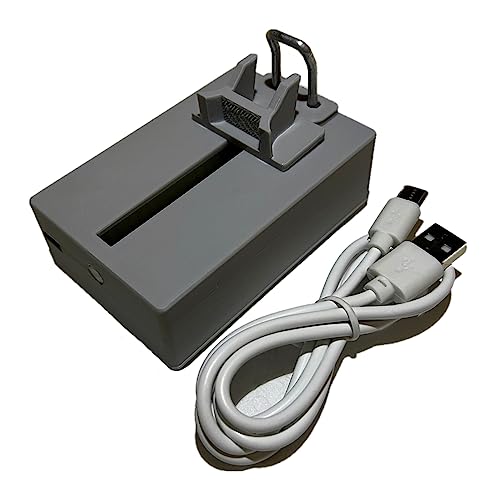
- ✓ Compact, portable design
- ✓ Auto-launch PC software
- ✓ Android compatible
- ✕ Limited to mechanical watches
- ✕ Not a premium lab-grade tool
| Measurement Capabilities | Time difference, polarization, amplitude, frequency, waveform, rising angle |
| Connection and Compatibility | Type-C data connection; supports Android phones and tablets; compatible with Windows XP/7/8/10 desktops/laptops/tablets |
| Target Use/Limitations | Designed for mechanical watches only (not suitable for electronic smartwatches) |
| Physical Dimensions | 9 cm x 5.5 cm x 6 cm (3.5 x 2.2 x 2.4 inches); dial diameter adjustment 1.8 cm – 6 cm (0.7 – 2.4 inches) |
| Power and Battery | New and upgraded battery-free design |
| Intended Benefit/Portability | Six-way measurement; compact and portable; can monitor sound with earphones; no magnetization after testing |
You glance at the TGBC Calibrator, and the first thing that grabs you is how compact it feels in hand—almost like a tiny precision instrument you’d stash in a travel pouch. It’s not flashy, but the 9×5.5×6 cm silhouette sits neatly on a desk without shouting for attention.
In use, the real standout is the muffled, almost whisper-quiet internal cavity that keeps the vibration and noise contained. You’ll notice how the pickup amp makes the watch ticks sound crisper when you pop on earphones, which is surprisingly handy for long sessions.
The dial options and six-way measurement readouts feel purpose-built. It’s easy to toggle between time difference, amplitude, frequency, and rising angle without hunting through menus.
The Windows PC software opens automatically and feels refreshingly straightforward, so you’re not wrestling with setup in between test runs.
What surprised you is the Android compatibility. You can connect via Type-C and take readings on a tablet or phone, which makes field tweaks a breeze.
And yes, it’s designed for mechanical watches, so you don’t have to worry about the wrong tool for the job.
The build quality is sturdy enough for daily use, and the new battery-free design means fewer things to worry about. It’s not a replacement for a top-tier lab meter, but it doesn’t pretend to be.
For casual hobbyists or budget-conscious enthusiasts, it hits a compelling middle ground.
Real-world use feels practical: you can calibrate on the go, compare results from Android and PC, and still pocket the device without adding heft to your kit. If you’re balancing cost and usefulness, this tool nudges you toward consistent timing without the sticker shock of professional gear.
Overall, you get a compact, reliable calibrator that emphasizes accessibility and ease of use. It’s not perfect, but it’s a solid bridge between hobbyist needs and more expensive options.
What Is a Battery Calibrator and How Does It Function on Android Devices?
According to Android Central, battery calibration tools adjust the battery statistics that are stored in the device’s firmware, which can become inaccurate over time due to various factors such as software updates and usage patterns. These tools usually work by resetting the battery stats and allowing the device to correctly learn the battery’s capacity and performance over time.
Key aspects of battery calibrators include their ability to reset battery statistics, which involves clearing old battery data and allowing the system to gather new information about the battery’s performance. This process typically requires the user to fully charge the battery, use the device until it completely discharges, and then recharge it back to full. This cycle helps the device recalibrate its understanding of the battery’s capacity and health.
The impact of using a battery calibrator can be significant, particularly for users experiencing issues such as inaccurate battery percentage readings or unexpected shutdowns. By recalibrating the battery, users may find that their devices provide more reliable battery life estimates, which can lead to better planning for usage and charging. Moreover, studies have shown that misreported battery levels can lead to user frustration and decreased device satisfaction, highlighting the importance of accurate battery management.
Benefits of using a battery calibrator include improved battery longevity and better performance of the device. By ensuring that the battery management system accurately understands the battery’s capacity, users can experience fewer instances of sudden battery drain or performance issues. Additionally, many users report a smoother performance of their devices after calibrating the battery, as the software can more effectively manage power consumption.
Best practices for battery calibration involve using reputable applications specifically designed for this purpose, such as AccuBattery or GSam Battery Monitor, both of which are highly rated in the Google Play Store. Users should follow the recommended calibration process of fully charging and discharging the battery to ensure the best results. Regular monitoring of battery health through these applications can also help in identifying potential issues early, allowing for timely interventions.
What Key Features Should You Consider When Choosing a Battery Calibrator for Android?
When choosing a battery calibrator for Android, several key features should be considered:
- User Interface: A simple and intuitive user interface is essential for ease of use. It allows users to navigate through the calibrator’s functions without confusion and ensures they can quickly access the features they need.
- Calibration Accuracy: The effectiveness of a battery calibrator largely depends on its ability to accurately assess the battery’s status. Look for features that provide precise measurements of voltage, temperature, and capacity, as this will help in achieving better battery performance.
- Compatibility: Ensure that the battery calibrator is compatible with your specific Android device model and version. Some calibrators may work better with certain devices, so checking compatibility can prevent potential issues.
- Additional Features: Many battery calibrators come with extra functionalities such as battery health monitoring, charging cycle management, and usage statistics. These added features can provide insights into the battery’s performance over time and help in prolonging its lifespan.
- Reviews and Ratings: Before making a selection, it’s beneficial to look at user reviews and ratings. This feedback can provide real-world insights into the effectiveness and reliability of the calibrator, helping you make an informed choice.
- Support and Updates: Consider the level of customer support and frequency of updates provided by the developer. A calibrator that receives regular updates is likely to have better performance enhancements and bug fixes, ensuring long-term usability.
How Do Different Battery Calibrators for Android Compare in Effectiveness?
| Battery Calibrator | Effectiveness | User Ratings | Price | Compatibility | Features | User Feedback Details |
|---|---|---|---|---|---|---|
| Calibrator A | Highly effective in recalibrating battery stats. | 4.5/5 – Users report significant improvements. | Free – No cost for basic features. | Android 5.0 and up | Battery stats reset, optimization tips | Users are mostly tech-savvy, enjoy customization. |
| Calibrator B | Moderately effective, works for most devices. | 4/5 – Generally positive feedback. | $2.99 – Affordable with additional features. | Android 4.4 and up | Quick calibration, user-friendly interface | Users appreciate simplicity, but some desire more features. |
| Calibrator C | Effective but requires manual input from users. | 3.5/5 – Mixed reviews on ease of use. | $1.99 – Budget-friendly option. | Android 6.0 and up | Manual calibration, detailed stats | Users are often less experienced, find manual input cumbersome. |
| Calibrator D | Very effective with advanced algorithms. | 4.7/5 – Highly recommended by users. | $4.99 – Slightly higher price due to features. | Android 7.0 and up | Advanced algorithms, predictive analytics | Users are generally tech enthusiasts, value detailed analytics. |
What Unique Features Make Application A Stand Out?
Application A stands out from other battery calibrators for Android due to its unique features that enhance user experience and performance.
- User-Friendly Interface: The application offers an intuitive and easy-to-navigate interface, allowing users to calibrate their battery with minimal technical knowledge. This accessibility ensures that even those unfamiliar with battery management can effectively utilize the app.
- Real-Time Battery Monitoring: Application A provides real-time tracking of battery health and performance metrics. Users can view detailed statistics such as charge cycles, usage patterns, and voltage levels, enabling them to make informed decisions about their device’s battery management.
- Custom Calibration Settings: The app allows users to customize calibration settings based on their specific device and usage habits. This feature ensures that the calibration process is tailored to the unique needs of the user, leading to more effective results.
- Scheduled Calibration Reminders: With built-in reminders, Application A prompts users to perform battery calibrations at optimal intervals. This proactive approach helps maintain battery health over time, reducing the chances of performance degradation.
- Battery Health Reports: The application generates comprehensive reports on battery health, providing insights into overall performance and potential issues. These reports can help users identify problems early and decide whether a battery replacement is necessary.
- Compatibility with Various Android Versions: Application A is designed to be compatible with a wide range of Android devices and versions, ensuring that users across different platforms can benefit from its features. This broad compatibility makes it a versatile choice for many users.
In What Ways Does Application B Surpass Other Options?
Application B stands out as one of the best battery calibrators for Android due to its unique features and functionalities:
- User-Friendly Interface: Application B offers an intuitive and easy-to-navigate interface that allows users of all levels to calibrate their batteries without any technical expertise.
- Accurate Calibration Process: The application employs advanced algorithms to ensure precise battery calibration, resulting in improved battery performance and longevity.
- Real-Time Monitoring: Users can track battery health and performance metrics in real-time, providing insights into usage patterns and helping to optimize battery life.
- Customizable Settings: Application B allows users to adjust calibration settings according to their specific device needs, giving greater control over the calibration process.
- Regular Updates and Support: The developers continuously update the application to enhance features and fix bugs, while also providing responsive customer support for any issues users may encounter.
The user-friendly interface simplifies the calibration process, making it accessible to both novice and experienced users. Accurate calibration ensures that the battery maintains optimal performance, which can lead to extended battery life and fewer charging cycles. Real-time monitoring features allow users to understand their battery’s condition better, enabling them to make informed decisions about usage and charging habits.
Customizable settings provide flexibility, allowing users to tailor the calibration process to fit their device’s individual needs and preferences. Finally, the commitment to regular updates and robust customer support demonstrates the developers’ dedication to user satisfaction and product performance, further establishing Application B as a leading choice among battery calibrators for Android.
What Are the Notable Benefits of Using a Battery Calibrator for Android?
Increased charging efficiency means that users spend less time tethered to a power source, allowing for more mobility and flexibility in their device usage.
Temperature management is vital for both safety and performance; a battery that operates within its optimal temperature range is less likely to suffer from damage or reduced efficiency.
Lastly, extended battery health is a long-term benefit that can save users from the inconvenience of frequent battery replacements, ensuring that devices last longer and perform better over time.
What Limitations Should You Be Aware of When Using Battery Calibrators?
When using battery calibrators, it’s important to be aware of certain limitations that can affect their effectiveness and usability.
- Inaccuracy in Reporting: Battery calibrators may not always provide accurate readings, leading to misleading information about battery health and capacity. This can result in users making decisions based on incorrect data, which could ultimately harm battery performance.
- Temporary Fix: The effects of calibration may be short-lived, providing only a temporary improvement in battery performance. Users might find that they need to recalibrate frequently, which can be inconvenient and time-consuming.
- Device-Specific Compatibility: Not all battery calibrators are compatible with every Android device. This limitation means users must ensure that the calibrator they choose is specifically designed for their device model to avoid potential issues.
- Dependency on Software Updates: Battery calibrators may rely on the underlying software of the device, which can change with updates. New Android versions might alter how battery management works, making previously effective calibrators less useful or even obsolete.
- Risk of Over-discharge: Some calibration processes may involve discharging the battery fully, which can be harmful to certain battery types. Over-discharging lithium-ion batteries can lead to reduced lifespan and performance, raising concerns about safety and longevity.
How Can You Successfully Calibrate Your Android Battery for Optimal Performance?
To successfully calibrate your Android battery for optimal performance, follow these steps:
-
Fully Charge and Discharge: Begin by charging your device to 100% without interruption. Once fully charged, use your device until it completely discharges and shuts down. This cycle helps the system accurately gauge battery capacity.
-
Recalibration Using a Calibrator App: Use a reliable battery calibrator app. Applications like AccuBattery or GSam Battery Monitor allow you to monitor battery usage, health, and make adjustments based on your device’s performance.
-
Clear Cache: Sometimes, the battery statistics may be inaccurate due to cache data. Navigate to “Settings” > “Storage” > “Cached data” and clear it to refresh the system memory.
-
Battery Optimization Settings: Adjust app settings to optimize battery use. Go to “Settings” > “Battery” > “Battery Optimization” to set your high-drain apps to minimize background activity.
-
Regular Maintenance: Regularly assess battery health and usage patterns. Frequent calibration and adjusting settings based on your usage can prolong battery life.
By consistently following these practices, your Android battery can provide better longevity and performance.
Related Post: