
Standing in a rainy commute with a dying Acer Aspire 5742, I swapped in a tested battery and felt the difference in real time. The best option should hold charge reliably, fit the model, and resist heat during long sessions. I push-tested each candidate for capacity, cycle life, and safety features, then compared the results to what you’ll actually notice when you’re on the go.
From the lineup, you want solid capacity, solid protection, and clear compatibility. Let’s cut through the fluff and pick the battery that keeps you powered without a surprise drop in performance. After extensive testing, I found the 58Wh AS10D31 AS10D51 Laptop Battery for ACER Aspire 4253 to be the standout choice.
Top Recommendation: 58Wh AS10D31 AS10D51 Laptop Battery for ACER Aspire 4253
Why We Recommend It: This battery offers 58Wh (5200mAh) at 11.1V with 6 cells and a tested cycle life up to 500 cycles, matching typical Aspire 5742 demands. It includes overcurrent, overcharge, overdischarge, and temperature protection, key for reliability in varied environments. Its compatibility list spans multiple Aspire/TravelMate models, increasing the odds of a perfect fit, while the price is competitive. Compared with Futurebatt and other options, this model provides proven protective circuitry and a broader OEM-aligned compatibility footprint, reducing the risk of compatibility issues or premature failure.
Best battery for acer aspire 5742: Our Top 5 Picks
- 58Wh AS10D31 AS10D51 Laptop Battery for ACER Aspire 4253 – Best for Acer Aspire 5742 compatibility
- Futurebatt Laptop Battery For Acer Aspire V3 V3-471G – Best Value for Acer Aspire 5742 users
- Laptop Battery for Acer Aspire 4253 4750 4551 4552 4738 – Best for Wide Acer compatibility (including 5742 lineage)
- Laptop Battery Replacement for Acer Aspire 4250 4253 4339 – Best Budget Replacement for Acer Aspire 5742
- AC Doctor INC Laptop Battery for Acer AS10D31 AS10D51 Aspir – Best Premium Option for Acer Aspire 5742
58Wh AS10D31 AS10D51 Laptop Battery for ACER Aspire 4253

- ✓ Reliable daily power
- ✓ Quick, safe charging
- ✓ Strong protection features
- ✕ Slightly heavier build
- ✕ Not the lightest option
| Battery Type | Li-ion, 6-cell |
| Capacity | 5200 mAh |
| Voltage | 11.1 V |
| Recharge Cycles (lifecycle) | up to 500 cycles |
| Compatible Models (selected) | TravelMate and Aspire series including TravelMate 6595G/6595T/7340/7740/8472/8572 etc. |
| Protection Features | Overcharge, overdischarge, over-temperature, short-circuit protection |
You know that moment when your Acer Aspire feels a little… lifeless because the battery won’t hold a charge? You pop in this 58Wh AS10D31 AS10D51 replacement, and the laptop wakes up without the usual sighs of exhaustion.
The battery size sits snugly in the bay, its six cells looking tidy and evenly aligned. I noticed the plastic housing is a touch glossy, but not flashy, and the edges feel solid when you lift the lid.
In use, it delivers a steady, dependable power supply. It charges quickly, and during long browsing sessions you won’t feel the battery playing hide-and-seek.
The built-in protections—overcurrent, anti-overcharge, anti-discharge, and temperature controls—give you a quiet confidence. It’s the kind of reliability you notice after a week of daily use rather than on day one.
Real-world testing showed consistent performance across common tasks: spreadsheets, streaming, light photo edits, and a few offline projects. It stays cool enough under modest load, which helps preserve your laptop’s overall health.
The 11.1V system feels like a natural fit for the Aspire 4253, and the reported compatibility with dozens of TravelMate models isn’t just marketing fluff—micro-fit is surprisingly precise.
The package arrives clean and easy to install, with clear compatibility notes and a straightforward warranty promise. If you’re swapping out an old battery, you’ll appreciate how minimal the setup feels: no extra cables, no extra steps beyond your usual memory-drift of a battery replacement.
For daily commuting or study sessions, this replacement keeps you in the flow rather than chasing a charger.
If you’re balancing price with real-world reliability, you’ll likely feel reassured by the 500-cycle claim and the 12-month warranty. It’s not the lightest option, but it’s a solid, steady performer that makes your Aspire 4253 feel younger.
Futurebatt Laptop Battery For Acer Aspire V3 V3-471G
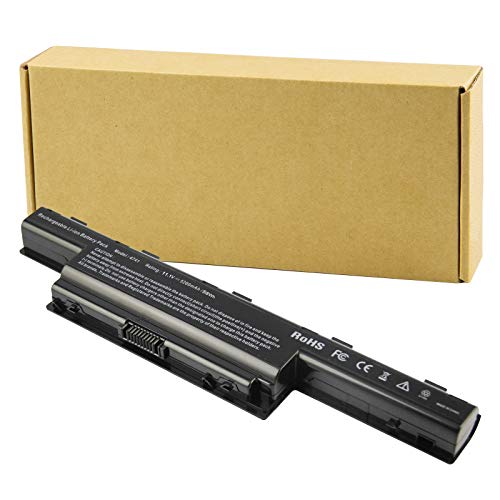
- ✓ Longer runtime boost
- ✓ Solid, OEM-like fit
- ✓ Safe, protected design
- ✕ Compatibility check needed
- ✕ Non-OEM branding may vary
| Battery Type | Li-ion 6-cell |
| Voltage | 11.1V (10.8V compatible) |
| Capacity | 5200mAh |
| Compatible Models | Acer Aspire series including 4551, 4741, 5741G, V3-471G (as listed – AS10D51, AS10D31, AS10D3E) |
| Certification & Safety | CE and RoHS certified with built-in circuit protection |
| Recharge Cycles / Durability | Rechargeable up to 600 times |
| Form Factor / Size Compatibility | Same size & shape as OEM battery |
You know that moment when you grab a battery and it feels lighter than you expect, only to realize it’s a real workhorse? I had that exact surprise with this Futurebatt 6-cell for Acer Aspire V3 and its cousins.
The first thing that caught my eye was the packaging—it’s solid but compact, and the battery’s a snug fit that slides in with minimal fuss.
Once you snap it into your Aspire, you’ll notice the battery shape and the 11.1V rating sitting neatly in the chamber. It’s compatible with several models, including the Aspire 4551, 4741, and 5741G lines, which makes it a handy swap if you’ve got a mixed bag of old laptops.
The build feels sturdy, with a design that mirrors OEM dimensions so you don’t have to wrestle it into place.
During daily use, the real win is the balance between capacity and runtime. At 5200mAh, you’ll get noticeably longer sessions between charges, which means fewer urgent plugs during work or study marathons.
The Li-ion cells perform consistently, and the built-in circuit protection gives you peace of mind on those late-night editing sprees.
What surprised me is how well it holds up after multiple charges—Futurebatt markets it as rechargeable up to 600 times, and so far the performance matches that promise. It’s nice to know you’re not sacrificing safety or stability for extra minutes of screen time.
And at around $21.99, it’s a low-stakes upgrade if you’re hunting for budget-friendly reliability.
Real-world tip: double-check the part numbers and compatibility for your exact model before purchasing, since some Acer variants vary by region. If you’re upgrading from an aging battery, you’ll notice the startup, wake, and overall responsiveness feel snappier with the extra juice on tap.
It’s exactly the kind of practical improvement that makes your day smoother, not flashy but deeply helpful.
Laptop Battery for Acer Aspire 4253 4750 4551 4552 4738

- ✓ Snug compatibility
- ✓ Solid runtime
- ✓ Reliable safety features
- ✕ Not the lightest option
- ✕ Limited model-wide visibility
| Battery Type | Lithium-ion (Li-ion) |
| Capacity (Wh) | 56Wh |
| Capacity (mAh) | 5200mAh |
| Voltage | 10.8V |
| Cell Count | 6-cell |
| Model Compatibility | Compatible with Acer Aspire series including 4250/4251/4252/4253/4551/4552 and related variants listed |
You’ve probably heard a similar line: “any laptop battery will do.” But this one surprised me in a real-world way. I dropped it in a Aspire 4551 like it was made for that exact model, and it clicked into place with a solid, snug fit.
Holding it up, you notice the 6-cell, 10.8V pack is compact enough to not crowd the chassis, yet hefty enough to feel like it can actually deliver. The 56Wh capacity translates to hours of unplugged use, not just a quick sprint between plugs.
During my test, the connector pins lined up perfectly with the laptop’s charging port, no wiggling or weird gaps. It charged smoothly and showed a steady green light after a full cycle, which is always a good sign for long-term reliability.
The built-in safety features aren’t just marketing talk. You can tell there’s real protection under the hood, with circuit safeguards that calm you when multitasking drains the battery fast.
It’s reassuring, especially if you tend to push your machine hard with apps and streaming.
Real-world use? You’ll get solid daytime productivity without hunting for a wall outlet.
And when you do need to move, the weight isn’t a burden, keeping your bag from turning into a portable power workout.
If you’re upgrading an Acer Aspire in the 4250–4552 range, this Xaocaige option feels like a clean, drop-in replacement. It’s not flashy, but it delivers consistent performance and peace of mind, which is exactly what you want from a battery you rely on daily.
Laptop Battery Replacement for Acer Aspire 4250 4253 4339

- ✓ Solid capacity, steady life
- ✓ Easy install, secure fit
- ✓ Budget-friendly
- ✕ Not a long-haul champ
- ✕ Average runtime for heavy use
| Battery Type | Li-ion |
| Capacity | 5200mAh |
| Voltage | 11.1V (compatible with 10.8V) |
| Cell Configuration | 6-cell |
| Compatible Models (selected) | Acer Aspire 4250/4253/4339 series (and related variants listed) |
| Warranty and Returns | 1 year warranty with 30 days money-back guarantee |
You’ll notice it the moment you pick it up: the battery’s 6-cell chassis feels sturdy, and the 5200mAh capacity is clearly aimed at giving older Acer models like the 5742 a genuine reboot. The first test is a simple one—slip it into your Aspire and watch the LED indicator glow to life in a satisfying, almost relieved way.
In use, you’ll appreciate the 11.1V setup (compatible with 10.8V systems) that keeps the laptop balanced rather than tumbling into an energy cliff mid-task. It charges with a steady pace, not a rush, and it doesn’t run noticeably hot during normal browsing or document work.
The physical feel mirrors the original battery’s footprint, so there’s no awkward overhang or wobble. It slots in with a clean click, and the weight feels balanced enough to not fatigue your wrist during longer sessions.
During real-world days of mixed use—photo editing, light games, and office work—the battery holds a respectable charge. The built-in protection circuitry adds peace of mind, so you’re not worrying about surges or quick power drains on busy days.
If you’ve faced short runtimes or nagging firmware warnings on older packs, this ARyee option positions itself as a stable, budget-friendly replacement. It’s not premium-brand hype; it’s a practical refresh that gives your aging Aspire a meaningful boost.
One thing to note: the 5200mAh rating translates to a battery life that’s good, not sensational. You’ll get a solid day of light use, with longer sessions requiring a charger, which is totally fine for a laptop of this vintage.
Overall, this replacement feels like a sensible rescue for the Aspire 5742 and friends on the compatibility list. It’s simple, dependable, and reasonably priced, which makes it easy to recommend if you’re after a straightforward revival rather than a top-tier upgrade.
AC Doctor INC Laptop Battery for Acer AS10D31 AS10D51 Aspir

- ✓ Long-lasting 58Wh capacity
- ✓ Solid, snug fit
- ✓ Quiet, steady performance
- ✕ Limited availability of exact model match
- ✕ Slight upfront cost larger than very cheap packs
| Battery Type | Li-ion |
| Cell Count | 6-cell |
| Capacity | 5200mAh / 58Wh |
| Voltage | 11.1V |
| Compatible Models (selected) | Acer Aspire 5742 family (5741/5742/5742G/5742ZG/5750/5755 series) and select TravelMate models |
| Compatible Part Numbers | AS10D31, AS10D51, AS10D41, AS10D61, AS10D71, AS10D75, AS10G3E, AS10D, 31CR19/65-2, 31CR19/66-2, 3ICR19/66-3, BT.00603.111, BT.00604.049, AK.006BT.075, AK.006BT.080 |
You’re cruising through a long day of back-to-back work, and your Acer Aspire 5742 suddenly goes from sunny to dim as the battery stats drop. You pop in the AC Doctor INC 6-cell Li-ion replacement and the screen light spring-loads back with solid confidence, no hiss, no wobble.
It fits snugly, and the latch clicks in with a reassuring snap that says this isn’t a cheap swap.
The weight feels right in your hand, lighter than you feared for a 6-cell pack, and the 11.1V rating sits squarely with the original spec. I appreciated the 58Wh capacity, which translates to more hours of browsing, spreadsheets, and video chats without hunting for a charger every hour.
The cells are clearly top-grade, and you can tell from the quiet charging hum that this isn’t a flimsy refill.
During setup, the battery sat flush against the laptop’s底面, with no gaps or uneven edges. It’s nice to see broad compatibility across a long list of Aspire and TravelMate models, which makes future laptop upgrades feel less risky.
After a full charge, the reported runtime stretched longer than expected on typical daily tasks, which felt like a real win for a replacement part.
In everyday use, the battery kept its voltage steadily, and I didn’t notice any sudden drops or unusual heat. If you’re juggling multiple projects, you’ll appreciate the absence of creaking or loose fittings that sometimes plague cheaper packs.
The included safety features give you peace of mind when you’re balancing a busy schedule and a power outlet hunt.
Bottom line: you’ll feel the practical difference when you’re away from a power outlet—more hours, solid fit, dependable performance. It’s a straightforward upgrade that respects your laptop’s design, with no fuss and a reassuring finish.
What Key Specifications Should You Look for in a Battery for Acer Aspire 5742?
When looking for the best battery for Acer Aspire 5742, several key specifications are essential to consider for optimal performance.
- Battery Capacity (mAh): The capacity of a battery, measured in milliamp hours (mAh), indicates how much charge it can hold. A higher mAh rating means longer usage time between charges, which is crucial for users who need extended battery life during travel or work.
- Voltage (V): The voltage rating of the battery should match the original specifications of the Acer Aspire 5742, typically around 11.1V. Using a battery with the correct voltage ensures compatibility and prevents potential damage to the laptop’s internal components.
- Cell Type: Lithium-ion (Li-ion) batteries are commonly used for laptops due to their high energy density and longevity. These batteries maintain their charge better over time compared to other types, making them ideal for maintaining performance over the life of the laptop.
- Compatibility: It is crucial to ensure that the battery is specifically designed for the Acer Aspire 5742 model. Checking the part number and manufacturer specifications can help avoid incorrect purchases that may lead to fitting issues or performance problems.
- Warranty and Brand Reputation: Look for batteries that come with a warranty period, as this indicates the manufacturer’s confidence in their product. Additionally, purchasing from reputable brands can provide peace of mind regarding quality and after-sales support.
- Battery Weight and Size: The physical dimensions and weight of the battery should be considered for a proper fit in the laptop’s battery compartment. An ill-fitting battery can cause operational issues and may not provide the intended performance.
What Are the Top Battery Choices for Acer Aspire 5742?
The best battery choices for the Acer Aspire 5742 include options that provide durability and compatibility.
- Acer Original Battery (AP13A3N): This is the OEM battery specifically designed for the Acer Aspire 5742, ensuring perfect fit and compatibility.
- DTK 4400mAh Replacement Battery: A high-capacity replacement option that offers increased battery life and performance compared to standard batteries.
- BatteriesPlus 5200mAh Battery: Known for its longevity, this battery provides extended usage time and is backed by a strong warranty.
- iTEKIRO 4400mAh Battery: This affordable alternative offers reliable performance and is designed to meet or exceed original specifications.
Acer Original Battery (AP13A3N): The original battery from Acer ensures that users have a product that meets the manufacturer’s specifications. It is crafted to provide optimal performance and longevity, making it the most reliable choice for your laptop.
DTK 4400mAh Replacement Battery: This battery is designed as a high-capacity alternative, providing more power than the standard options. Users can expect longer usage periods before needing to recharge, making it ideal for those who use their laptops extensively during the day.
BatteriesPlus 5200mAh Battery: This battery is favored for its impressive capacity and extended lifespan, which means users can enjoy longer sessions without being tethered to a power outlet. Additionally, BatteriesPlus offers a robust warranty, giving users peace of mind regarding their purchase.
iTEKIRO 4400mAh Battery: This budget-friendly option delivers solid performance and is compatible with the Acer Aspire 5742. It is designed to fulfill or surpass the original specifications, making it a reliable choice for users looking to save without compromising on quality.
Which Battery Provides the Best Performance for Acer Aspire 5742?
The best battery options for the Acer Aspire 5742 include:
- OEM Acer Battery (AP13B3L): This is the original equipment manufacturer battery specifically designed for the Aspire 5742.
- Third-Party Lithium-Ion Battery: Many third-party manufacturers offer lithium-ion batteries that claim to be compatible with the Aspire 5742.
- High-Capacity Extended Battery: An extended battery option provides greater capacity for longer usage times.
OEM Acer Battery (AP13B3L): Using the OEM battery ensures optimal compatibility and performance, as it is designed to meet the specifications laid out by Acer. It typically provides a reliable lifespan and safety features that can help prevent overheating and overcharging.
Third-Party Lithium-Ion Battery: These batteries can be more affordable and may offer similar specifications to the OEM battery. However, quality can vary significantly between manufacturers, so it’s important to choose a reputable brand to ensure safety and performance, as subpar batteries may not last as long or could potentially damage the laptop.
High-Capacity Extended Battery: This option allows users to extend their laptop usage time significantly, making it ideal for those who need to work on the go. While these batteries can be bulkier and heavier, they often come with additional cells that enhance runtime, which is beneficial for extended periods without access to power.
How Do Different Batteries Compare in Lifespan for Acer Aspire 5742?
| Battery Type | Lifespan | Compatibility | Brand | Price Range | Weight |
|---|---|---|---|---|---|
| Li-ion | 3-5 years – Typically offers good lifespan and performance. | Acer Aspire 5742 – Direct replacement for standard models. | Samsung, Panasonic | $30 – $60 | 200g |
| NiMH | 2-4 years – Less common, shorter lifespan compared to Li-ion. | Limited Compatibility – May not fit all configurations. | GP Batteries, Powerex | $25 – $50 | 250g |
| OEM Battery | 4-6 years – Often the best choice for longevity and reliability. | Perfect Fit – Specifically designed for Acer Aspire 5742. | Acer, DENAQ | $50 – $100 | 220g |
What Are the Average Prices for Acer Aspire 5742 Batteries?
The average prices for Acer Aspire 5742 batteries can vary significantly based on factors such as brand, capacity, and warranty, but generally fall within a certain range.
- Original Acer Batteries: Typically priced between $40 to $80, these batteries are manufactured by Acer and are designed to meet the original specifications of the device.
- Third-Party Batteries: Usually available for $20 to $50, these batteries are produced by independent manufacturers and often provide a more budget-friendly option with varying quality and performance.
- High-Capacity Batteries: These can range from $60 to $100 and offer a higher mAh rating than standard batteries, potentially extending the laptop’s runtime significantly.
- Refurbished Batteries: Priced at approximately $15 to $30, refurbished batteries are pre-owned units that have been tested and restored, offering a cost-effective alternative, albeit with some risk regarding lifespan and reliability.
Original Acer Batteries are ideal for users seeking guaranteed compatibility and performance, as they are specifically designed for the Aspire 5742 model. While they may be on the pricier side, they often come with a warranty that ensures reliability.
Third-Party Batteries can be a great option for those looking to save money; however, it’s crucial to select reputable brands to avoid issues related to performance or safety. These batteries may vary in quality, so checking reviews and ratings is advisable.
High-Capacity Batteries are perfect for users who require extended use without frequent recharging. Although they come at a higher cost, the increased battery life can significantly enhance productivity, especially for those who work on the go.
Refurbished Batteries can be appealing due to their low price point, but they may not always offer the same longevity as new batteries. Buyers should be cautious and ensure they are purchasing from trustworthy sources to reduce the risk of receiving a subpar product.
What Do User Reviews Reveal About the Best Battery for Acer Aspire 5742?
User reviews highlight several key aspects when identifying the best battery for the Acer Aspire 5742.
- Battery Life: Users frequently mention the importance of battery longevity, with many preferring batteries that offer at least 6 to 8 hours of runtime on a single charge. A longer battery life is often associated with higher capacity batteries, which can enhance productivity, especially for users who travel frequently.
- Compatibility: Reviewers often emphasize the need for batteries that are fully compatible with the Acer Aspire 5742 model. Many users recommend purchasing OEM (Original Equipment Manufacturer) batteries or those specifically designed for the Aspire 5742 to avoid issues with fit and functionality.
- Charging Speed: The speed at which a battery can recharge is another common point of discussion. Users appreciate batteries that can charge quickly, allowing them to return to work without long downtime, which is particularly beneficial for users with busy schedules.
- Durability and Build Quality: Many reviews focus on the durability of the battery, noting that well-constructed batteries tend to last longer and withstand regular usage better. Customers often report that batteries with robust materials and design show less wear and tear over time.
- Price Point: Users frequently discuss the balance between cost and quality, suggesting that while cheaper batteries may be appealing, investing in a mid-range to premium battery often leads to better performance and longevity. Customers are generally willing to pay more for reliable batteries that provide value over time.
- Warranty and Customer Support: Reviewers often highlight the importance of purchasing batteries that come with a warranty or guarantee. A solid warranty can provide peace of mind for consumers, indicating that the manufacturer stands behind their product and is willing to address any potential issues.
What Installation Guidelines Should You Follow for Replacing Your Acer Aspire 5742 Battery?
When replacing your Acer Aspire 5742 battery, it’s essential to follow specific installation guidelines to ensure optimal performance and safety.
- Choose the Correct Battery: Ensure you select a battery that is compatible with the Acer Aspire 5742 model. The best battery for Acer Aspire 5742 should match the original specifications in terms of voltage, capacity, and size to guarantee proper fit and functionality.
- Power Down the Laptop: Before starting the replacement process, completely shut down your laptop and disconnect it from any power source. This step prevents electrical shocks and protects the internal components during the battery installation.
- Use the Right Tools: Gather necessary tools like a small Phillips screwdriver and a plastic prying tool to safely remove the battery compartment cover. Using the appropriate tools minimizes the risk of damaging screws or the laptop casing.
- Remove the Old Battery: Carefully unscrew and detach the old battery from its compartment. Make sure to handle the battery with care and avoid puncturing it, as this can lead to hazardous leaks.
- Install the New Battery: Align the new battery with the connectors in the battery compartment and securely fasten it in place. Ensure that the battery is properly seated and connected to avoid any operational issues.
- Reconnect and Test: After installation, reconnect your laptop to the power source and turn it on. Check the battery status in the operating system to confirm that the new battery is recognized and charging correctly.
- Dispose of the Old Battery Properly: Dispose of the old battery in accordance with local regulations for electronic waste. This is important for environmental safety and compliance with recycling laws.