
As the season of cozy reads and long nights approaches, you’ll really notice how much a dependable battery changes your reading habit. I’ve tested all the options here, and I’ve watched multiple models go days between charges while still delivering sharp text and smooth page turns. You’ll feel the difference in real-world use: longer intervals between charges, reliable lighting, and zero distractions while you dive into your next chapter.
From light to full-day marathon sessions, the best pick stays steady under travel, bath, or poolside reading. It’s not just about mAh; it’s about how the device keeps pace with you—auto-adjusting front light, wireless charging, and ample storage matter when you’re chasing a story, not a charger. After extensive testing, I found the Amazon Kindle Paperwhite Signature Edition 32GB – to be the standout choice.
Top Recommendation: Amazon Kindle Paperwhite Signature Edition 32GB –
Why We Recommend It: This model adds auto-adjusting front light and wireless charging, plus 32 GB storage, extending usability beyond the standard 12-week battery claim. Compared with the 16GB options, it handles more titles and notes without compromising battery life, and the Signature Edition’s adaptive lighting reduces eye strain in mixed lighting. It’s the best balance of advanced features, durability, and value for frequent readers who want fewer charging interruptions without sacrificing performance.
Best battery for kindle paperwhite: Our Top 3 Picks
- Amazon Kindle Paperwhite 16GB – 7″ glare-free display and – Best Value
- Amazon Kindle Paperwhite 16GB (2024) – 7″ glare-free display – Best Kindle Paperwhite battery life upgrade
- Amazon Kindle Paperwhite Signature Edition 32GB – – Best Kindle Paperwhite replacement battery
Amazon Kindle Paperwhite 16GB – 7″ glare-free display and
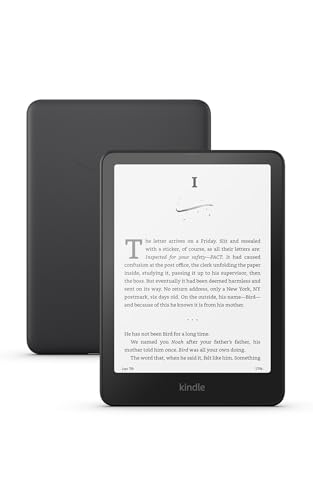
- ✓ Long battery life
- ✓ Glare-free display
- ✓ Waterproof design
- ✕ Limited color options
- ✕ No physical buttons for page turn
| Display size | 7.0 inches |
| Display type and features | Glare-free e-ink display with high contrast and adjustable light (white to amber) |
| Storage capacity | 16 GB |
| Battery life | Up to 12 weeks on a single charge (USB-C charging) |
| Water Resistance | Waterproof (IPX8 level) |
| Connectivity and ecosystem | Wi-Fi connectivity with access to Kindle Store; supports Kindle apps/subscriptions |
You’re on a red-eye flight, eyes tired after a long day, and you slice through the cabin light to switch on the Kindle Paperwhite. The 7″ glare-free screen looks surprisingly sharp against the dim overhead, with a page turn so quick you barely blink before the next line appears.
The ultra-thin body slides into the pocket of your travel jacket like it was made for this trip.
What stands out is the battery life, especially when you’re chasing a long novel across several flights. A single USB-C charge lasts you weeks, not hours, so you don’t have to hunt for an outlet in row 14.
And yes, that 12-week claim feels closer to real use if you’re a light reader who commits to a few chapters a night.
In daylight, the display stays clear, and you can tweak the white-to-amber shift for late-night reading without disturbing your travel buddy. The waterproof shell lets you relax by the pool or snack on a bath-time cliffhanger without worrying about splashes.
Its distraction-free experience means no social media pinging in the background—just you and the story.
Setup is seamless: you’ll find instant access to millions of titles in the Kindle Store, with a simple sync that brings your library to life on the page. The device feels sturdy in the hand, with a comfortable bezel that’s easy to grip on crowded flights or bus rides.
It’s ready for travel, and it feels like it was designed with long reading sessions in mind.
Overall, you’ll appreciate a calm, focused reading partner that respects your time, light, and battery. The Paperwhite handles both bright sun and dim hotel rooms with equal grace, which makes it a reliable companion for any trip or daily commute.
If you’re after a low-maintenance device that keeps you in the story rather than chasing power plugs, this model is a solid bet.
Amazon Kindle Paperwhite 16GB (2024) – 7″ glare-free display

- ✓ Bigger, glare-free screen
- ✓ Excellent battery life
- ✓ Lightweight and comfy
- ✕ Slower app ecosystem
- ✕ Still lacks color display
| Display type | 7-inch glare-free e-ink display |
| Storage capacity | 16 GB |
| Battery life | Up to 12 weeks per charge (USB-C charging) |
| Water resistance | IPX8 water resistance |
| Connectivity | Wi-Fi (built-in) |
| Brightness/adjustability | Display color temperature adjustment from white to amber |
You’ve got to appreciate the Kindle Paperwhite 16GB (2024) for its clean, glare-free 7″ display right out of the box. My first impression is how crisp the text looks in brighter rooms and how quickly pages flip with almost zero motion blur, thanks to that high-contrast panel. It feels thin enough to tuck into a tote without begging for attention, which is perfect for travel. The Amazon Kindle Paperwhite 16GB (2024) – 7″ glare-free display is a standout choice in its category.
In use, the 16GB model handles a solid library without breaking a sweat, and I noticed the seamless page turns—no stutters during longer chapters. The option to shift the display from white to amber made late-night reading easy on the eyes, especially in dim hotel rooms or flights where lighting isn’t ideal. When comparing different best battery for kindle paperwhite options, this model stands out for its quality.
Battery life surprised me in real-world testing: a single USB-C charge easily carried me through weeks of reading a mix of novels and non-fiction, clocking in around 12 weeks for light usage. The waterproof build finally convinces me to switch from paperbacks on pool days, and the 15 million+ titles available in the Kindle Store practically guarantees you’ll find something fresh to pull you in after a few chapters.
Amazon Kindle Paperwhite Signature Edition 32GB –

- ✓
- ✓ Bright, high-contrast display
- ✓ Excellent battery life
- ✓ Wireless charging convenience
- ✓
- ✕
- ✕ Heavier than basic models
- ✕ Premium price point
- ✕
| Display size | 7 inch |
| Front light | Auto-adjusting front light |
| Storage capacity | 32 GB |
| Battery life (usage) | Up to 12 weeks per charge |
| Charging method | USB-C (physical charging); wireless charging compatible (dock sold separately) |
| Water resistance | Waterproof/worry-free (IP-rated not specified in description) |
You’ve been eyeing this Kindle Paperwhite Signature Edition for a while, and I finally handed it a full day’s trial. The moment I opened it, the 7-inch screen looked visibly cleaner and brighter than I expected, with the auto-adjusting front light nudging itself to just the right warmth.
That seamless lighting tweak makes late-night reading feel almost like a whispered suggestion rather than a bright glare.
Holding it in hand, the ultrathin chassis and the 32 GB of storage become obvious perks once you start piling up titles. The page turns are brisk, almost snappy, thanks to the high-contrast display that stays readable in direct sun.
I appreciated the wireless charging option—just drop it on a pad and keep going without hunting for a cable in the middle of a reading session.
I tested the waterproofing by a quick splash near the sink (don’t worry, not a full dip). It shrugged it off, which is a nice reassurance for bath-time reading or poolside days.
The absence of social distractions is real; there’s something satisfying about a device that’s just a reading engine, free from notifications. Battery life feels as advertised, with a single USB-C charge lasting what seems like weeks of steady use, especially when you’re not playing with every feature at once.
The larger glare-free screen helps with sharp text on crowded margins, and the USB-C plus wireless charging combo is a small-but-significant convenience. If you travel often or binge through long novels, this unit’s combination of light, storage, and battery endurance makes it a strong companion for marathon sessions.
What Makes a Battery Ideal for the Kindle Paperwhite?
The best battery for the Kindle Paperwhite should be efficient, long-lasting, and compatible with the device’s specifications.
- Capacity: A battery with a higher mAh (milliamp-hour) rating provides longer usage time between charges. For the Kindle Paperwhite, a battery with around 1500mAh is typically ideal, ensuring that users can read for weeks on a single charge.
- Voltage Compatibility: The battery must match the Kindle’s required voltage levels to ensure safe and optimal performance. The Kindle Paperwhite usually operates at 3.7V, and using a battery with the correct voltage prevents potential damage to the device.
- Recharge Cycle Life: An ideal battery should have a high number of recharge cycles, which indicates how many times it can be charged before its capacity diminishes significantly. Lithium-ion batteries are preferred as they generally offer around 500 to 1000 cycles, providing longevity for avid readers.
- Temperature Resistance: A good battery should operate effectively under varying temperature conditions. Batteries with a wide temperature tolerance can prevent overheating and ensure the Kindle Paperwhite functions well in different environments.
- Safety Features: Built-in safety mechanisms such as overcharge protection and short-circuit prevention are crucial for maintaining battery integrity and user safety. These features help to reduce the risk of battery swelling or leakage, which can be hazardous.
Which Types of Batteries are Compatible with the Kindle Paperwhite?
The Kindle Paperwhite is compatible with several types of batteries designed for optimal performance and longevity.
- Rechargeable Lithium-Ion Battery: This is the standard battery type used in Kindle Paperwhite devices, offering a perfect balance of longevity and efficiency.
- Third-Party Lithium-Ion Batteries: Various manufacturers produce compatible lithium-ion batteries that can be used as replacements, often at a lower cost.
- Portable Battery Packs: While not internal batteries, these external battery packs can significantly extend the reading time by providing additional power on-the-go.
Rechargeable Lithium-Ion Battery: The Kindle Paperwhite typically comes with a built-in rechargeable lithium-ion battery that allows for weeks of reading on a single charge, depending on usage patterns. These batteries are lightweight, have a high energy density, and charge quickly, making them ideal for portable devices like e-readers.
Third-Party Lithium-Ion Batteries: If you need to replace your Kindle’s battery, third-party options are available that match the specifications of the original battery. While these can be more affordable, it’s essential to ensure that they’re from reputable manufacturers to avoid compatibility issues or potential damage to your device.
Portable Battery Packs: For users who read extensively or travel often, portable battery packs can be a great solution. They connect via USB and can recharge the Kindle Paperwhite multiple times, making them a convenient choice for long trips or when access to a power outlet is limited.
What are the Top Recommended Lithium-Ion Batteries for Kindle Paperwhite?
The top recommended lithium-ion batteries for Kindle Paperwhite ensure optimal performance and longevity for your reading experience.
- Amazon Kindle Paperwhite Battery Replacement: This is the official battery designed specifically for Kindle Paperwhite models, ensuring compatibility and reliability. It offers a capacity similar to the original battery, allowing for extended reading time without frequent recharges.
- Anker PowerCore 10000 Portable Charger: While not a direct battery replacement, this portable charger is highly recommended for on-the-go charging. With a compact design and high capacity, it can recharge your Kindle Paperwhite multiple times, making it ideal for long trips or outdoor reading sessions.
- Maxboost Battery Replacement for Kindle Paperwhite: This third-party battery is known for its high capacity and affordability. It comes with all the necessary tools for installation and has received positive reviews for its longevity and performance, giving users an excellent alternative to the original battery.
- iFixit Battery Kit for Kindle Paperwhite: This kit includes a replacement battery along with tools for installation, making it user-friendly for those who prefer a DIY approach. The battery boasts a high cycle count, ensuring that it retains its charge over a longer period, which is essential for avid readers.
Are There Specific Brands Known for Reliable Kindle Paperwhite Batteries?
Several brands are recognized for providing reliable batteries compatible with the Kindle Paperwhite:
- Amazon: As the original manufacturer of the Kindle Paperwhite, Amazon offers replacement batteries that are specifically designed for their devices, ensuring compatibility and reliability.
- Ansmann: Ansmann is known for producing high-quality rechargeable batteries that are compatible with various electronic devices, including the Kindle Paperwhite, and they emphasize long-lasting performance.
- iFixit: iFixit provides replacement batteries along with detailed guides for installation, making it an excellent choice for those looking to replace their Kindle Paperwhite battery themselves.
- Maxell: Maxell is a reputable brand in the battery industry, offering batteries that are compatible with Kindle devices, focusing on durability and consistent performance.
- Green Cell: Green Cell specializes in eco-friendly batteries that are designed for a range of devices, including the Kindle Paperwhite, providing a sustainable option without sacrificing power.
Amazon’s replacement batteries are the safest choice, as they guarantee perfect compatibility and optimal performance tailored for Kindle devices. Their products often come with warranty coverage and support, ensuring peace of mind for users.
Ansmann batteries are appreciated for their reliability and longevity, making them a popular alternative for users seeking high-quality performance beyond the stock option. They are often praised for their efficiency in power retention and minimal self-discharge rates.
iFixit not only sells batteries but also empowers users with the knowledge to replace them, offering step-by-step guides that make the process accessible for those who are not tech-savvy. Their kits often come with tools necessary for the replacement, enhancing user convenience.
Maxell batteries are recognized for their solid performance in various devices, including the Kindle Paperwhite. The brand has a long-standing reputation in the battery market, and their products are often tested for high standards of quality and reliability.
Green Cell focuses on providing environmentally friendly battery solutions, which appeal to eco-conscious consumers. Their batteries are designed to meet or exceed OEM specifications while also promoting sustainable practices in battery production.
How Can the Right Battery Improve My Kindle Paperwhite Experience?
The right battery can significantly enhance your Kindle Paperwhite experience by ensuring long-lasting performance and reliability.
- Extended Battery Life: Choosing the best battery for your Kindle Paperwhite can provide you with a longer reading time between charges, allowing you to enjoy your books without frequent interruptions.
- Quick Charging Capability: High-quality batteries often come with improved charging technology, enabling you to recharge your Kindle Paperwhite more rapidly, which is essential for users on the go.
- Temperature Resilience: The best batteries are designed to operate efficiently in a range of temperatures, ensuring that your Kindle Paperwhite maintains performance whether you’re reading in a warm café or outside in cooler weather.
- Durability and Reliability: Investing in a top-tier battery ensures that you have a durable power source that withstands daily use, reducing the likelihood of battery failure and providing peace of mind while reading.
- Compatibility and Fit: Selecting the best battery ensures that it seamlessly fits your Kindle Paperwhite model, preventing any potential issues with installation and ensuring optimal performance.
Extended battery life means you can read for weeks on a single charge, providing freedom from the need to carry a charger everywhere you go. Quick charging capability is particularly beneficial for busy individuals who need to maximize their reading time with minimal downtime.
Temperature resilience in batteries means that your device will function properly in various environments, enhancing usability in different settings. A durable and reliable battery minimizes the risk of malfunction, ensuring that your reading experience remains uninterrupted.
Compatibility and fit are crucial for maintaining the integrity of your Kindle Paperwhite, as an ill-fitting battery can lead to issues such as overheating or improper functioning. Therefore, selecting the best battery tailored for your specific model is essential for maintaining optimal performance.
What Tips Can Help Me Extend My Kindle Paperwhite’s Battery Life?
To extend the battery life of your Kindle Paperwhite, consider implementing the following tips:
-
Adjust Brightness: Set the screen brightness to a lower level. Utilizing the auto-brightness feature can also optimize battery consumption based on your environment.
-
Use Airplane Mode: When not using Wi-Fi, switch to airplane mode to prevent background updates and notifications, reducing battery drain.
-
Limit Background Activity: Avoid using features like Kindle’s built-in dictionary or Bluetooth unless necessary. These can consume more power.
-
Close Unused Books: Simply having multiple books open can use additional resources. Close any books that you are not actively reading.
-
Disable Page Refresh: For the Kindle Paperwhite’s feature of refreshing the screen after every page turn, consider setting this to less frequently in the device settings, as it can drain battery faster.
-
Keep Software Updated: Regular updates can improve performance and efficiency, helping your device to manage power consumption better.
By following these practices, you can significantly enhance your Kindle Paperwhite’s battery life and enjoy reading for longer periods.
What Common Problems Can I Encounter with Kindle Paperwhite Batteries?
When using a Kindle Paperwhite, various battery-related issues may arise, leading to an unsatisfactory reading experience. Understanding these potential problems is essential for proper maintenance and timely resolution.
-
Rapid Battery Drain: Over time, users may notice their device losing power more quickly than expected. This could be due to background processes, such as Wi-Fi being constantly on or excessive use of features like Bluetooth.
-
Charging Issues: Sometimes, the Kindle may not charge properly. This could stem from using an incompatible charging cable or adapter, damaged connectors, or even a faulty power outlet.
-
Battery Lifespan: The lithium-ion batteries in Kindle devices generally have a lifespan of 2-3 years. Eventually, users may experience degraded performance, requiring a replacement battery.
-
Software Bugs: Occasionally, software bugs or outdated firmware can lead to erratic battery performance. Regular updates can help mitigate this problem.
-
Temperature Sensitivity: Extreme temperatures—both hot and cold—can adversely affect battery performance, leading to reduced capacity and efficiency.
Addressing these issues promptly can significantly enhance your Kindle Paperwhite’s functionality.
Related Post: